# Adminator HTML5 Admin Template
**Adminator** is a responsive Bootstrap 4 Admin Template. It provides you with a collection of ready to use code snippets and utilities, custom pages, a collection of applications and some useful widgets. Preview of this awesome admin template available here: https://colorlib.com/polygon/adminator/index.html
# Preview
### Screenshot
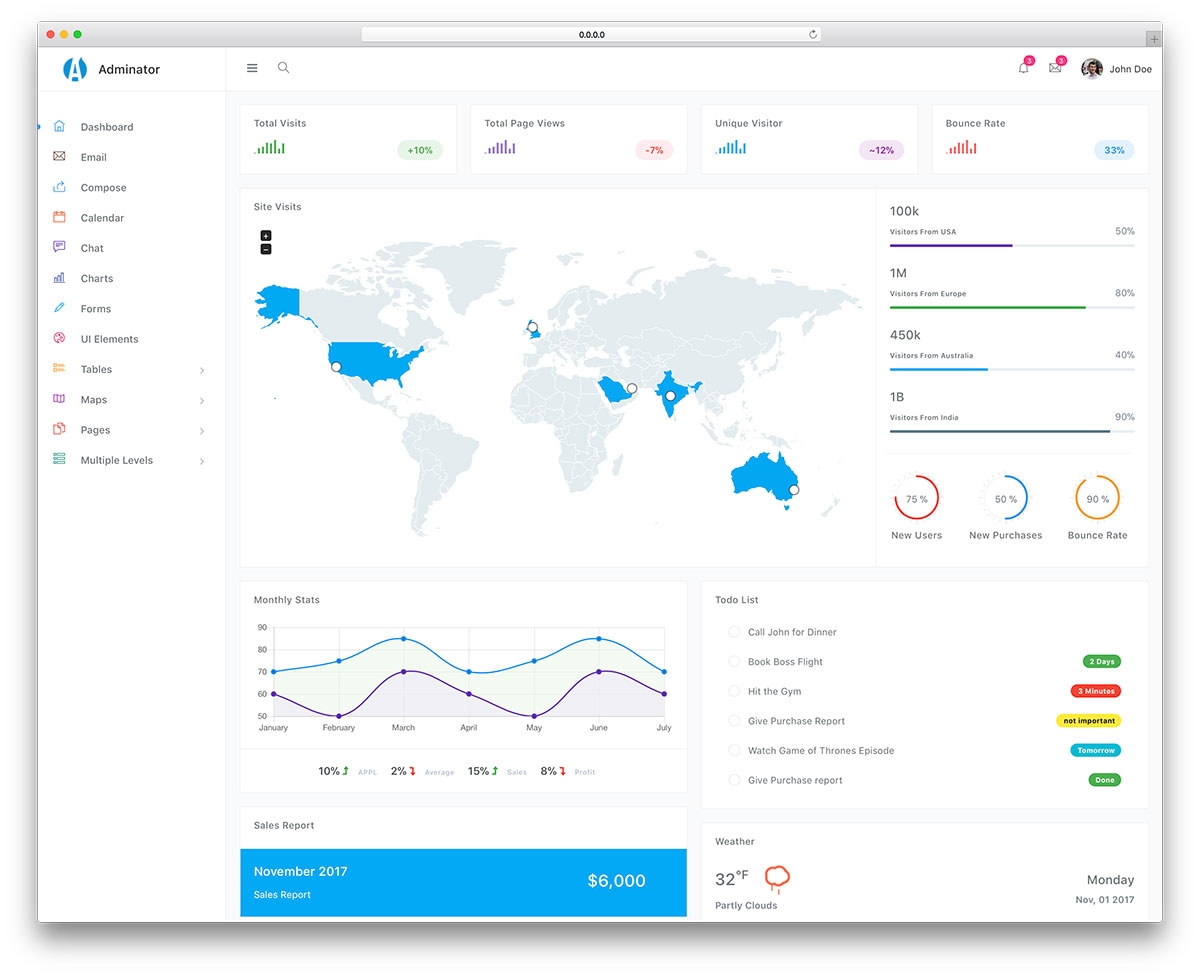
### Demo Site: [Here](https://colorlib.com/polygon/adminator/index.html)
### TOC
- [Getting Started](#getting-started)
- [Prerequisites](#prerequisites)
- [Installing & Local Development](#installing-local-development)
- [Files/Folder Structure](#filesfolder-structure)
- [Deployment](#deployment)
- [Built With](#built-with)
- [Changelog](#changelog)
- [Authors](#authors)
- [License](#license)
### Getting Started
In order to run **Adminator** on your local machine all what you need to do is to have the prerequisites stated below installed on your machine and follow the installation steps down below.
#### Prerequisites
- Node.js
- Yarn or NPM
- Git
#### Installing & Local Development
Start by typing the following commands in your terminal in order to get **Adminator** full package on your machine and starting a local development server with live reload feature.
```
> git clone https://github.com/puikinsh/Adminator-admin-dashboard.git adminator
> cd adminator
> npm install
> npm run dev
```
### Files/Folders Structure
Here is a brief explanation of the template folder structure and some of its main files usage:
```
└── src # Contains all template source files.
│ └── assets # Contains JS, CSS, images and icon fonts.
│ │ └── scripts # Contains all JavaScript files.
│ │ │ └── charts # Chart.js, Sparkline & Pie Chart plugins init.
│ │ │ └── chat # All chat app JS code.
│ │ │ └── constants # Template constant values like color values.
│ │ │ └── datatable # Date table plugin init.
│ │ │ └── datepicker # Bootstrap datepicker init.
│ │ │ └── email # All email app code.
│ │ │ └── fullcalendar # Fullcalendar plugin init.
│ │ │ └── googleMaps # Google maps API integration code.
│ │ │ └── masonry # Masonry layout code.
│ │ │ └── popover # Bootstrap popover plugin init.
│ │ │ └── scrollbar # Perfect scrollbar plugin init.
│ │ │ └── search # Topbar toggle search init.
│ │ │ └── sidebar # Sidebar JS code.
│ │ │ └── skycons # Animated icons plugin init.
│ │ │ └── utils # Basic utils used for proper rendering.
│ │ │ └── vectorMaps # Vector maps plugin init.
│ │ │ └── index.js # Indicator file.
│ │ │
│ │ └── static # Contains the non-code files.
│ │ │ └── fonts # Contains icon fonts.
│ │ │ └── images # Contains all template images/svg.
│ │ │
│ │ └── styles # Contains all SCSS files.
│ │ └── spec # Contains custom SCSS files.
│ │ │ └── components # Contains all template components.
│ │ │ └── generic # Contains basic scaffolding styles.
│ │ │ └── screens # Contains views specific styles.
│ │ │ └── settings # Contains all template variables.
│ │ │ └── tools # Contains all mixins.
│ │ │ └── utils # Contains helper classes.
│ │ │ └── index.scss # Indicator file.
│ │ │
│ │ └── vendor # Contains all plugin files & custom styles.
│ │ └── index.scss # Indicator file.
│ │
│ └── *.html # All HTML pages files .
└── webpack # Contains Webpack init code.
│ └── plugins # Contains all Webpack plugins config.
│ └── rules # Contains Loaders config code.
│ └── config.js # Contains Webpack config object.
│ └── devServer.js # Webpack dev server config code.
│ └── manifest.js # All build system constants.
│
└── .babelrc # Babel ES6 Transpiler.
└── .editorconfig # Keep same coding styles between code editors.
└── .eslintrc.yml # JavaScript Linting.
└── .gitattributes # Git Attributes.
└── .gitignore # Ignored files in Git.
└── .stylelintrc.yml # SCSS/CSS Linting.
└── browserslist # Supported Browsers.
└── CHANGELOG.md # Versioning.
└── package.json # Package metadata.
└── README.md # Manual file.
└── webpack.config.js # Webpack main config file.
└── yarn.lock # Yarn metadata.
```
### Deployment
In deployment process, you have two commands:
1. Build command
Used to generate the final result of compiling src files into build folder. This can be achieved by running the following command:
```
> npm run build
```
2. Preview command
Used to create a local dev server in order to preview the final output of build process. This can be achieved by running the following command:
```
> npm run preview
```
### Built With
- [Babel](https://babeljs.io/)
- [Webpack](https://webpack.js.org/)
- [Eslint](https://eslint.org/)
- [Sass](http://sass-lang.com/)
- [Postcss](http://postcss.org/)
- [Stylelint](https://stylelint.io/)
- [Bootstrap](http://getbootstrap.com/)
- [Chart.js](http://www.chartjs.org/)
- [Datatables](https://datatables.net/)
- [Easy Pie Chart](http://rendro.github.io/easy-pie-chart/)
- [Fullcalendar](https://fullcalendar.io/)
- [Jquery](https://jquery.com/)
- [Jquery Sparkline](https://omnipotent.net/jquery.sparkline/)
- [Jvectormap](http://jvectormap.com/)
- [Load Google Maps API](https://github.com/yuanqing/load-google-maps-api)
- [Lodash](https://lodash.com/)
- [Masonry](https://masonry.desandro.com/)
- [Moment](https://momentjs.com/)
- [Perfect Scrollbar](https://github.com/utatti/perfect-scrollbar)
- [Skycons](https://darkskyapp.github.io/skycons/)
- [Fontawesome](http://fontawesome.io/)
- [Themify Icons](https://themify.me/themify-icons)
- [Roboto Font](https://fonts.google.com/specimen/Roboto)
- [Bootstrap Datepicker](https://bootstrap-datepicker.readthedocs.io/en/latest/)
### Changelog
#### V 1.0.0
Initial Release
### Authors
[Colorlib](https://colorlib.com)
### License
Adminator is licensed under The MIT License (MIT). Which means that you can use, copy, modify, merge, publish, distribute, sublicense, and/or sell copies of the final products. But you always need to state that Colorlib is the original author of this template.